BlueROV2
Robot / hardware buildCommercial underwater ROV with published integration CAD and open software; this profile selects the standard six-thruster R4 configuration and distinguishes it from the Heavy upgrade. [1]
Build & first use →Official website
- For
- ROV operators and researchers assessing configuration, integration and source availability [1]
- Cost
- No current cost or bill of materials established yet.
- Source rights
- Some licenses are unresolved. Review licenses
- Unknowns
- tools not fully established. Review gaps
Source researched · Not tested by us
Sources checked · Research details
Licenses & related hardware
- License
- not fully assessed for mechanical design, documentation · Details by part
Overview
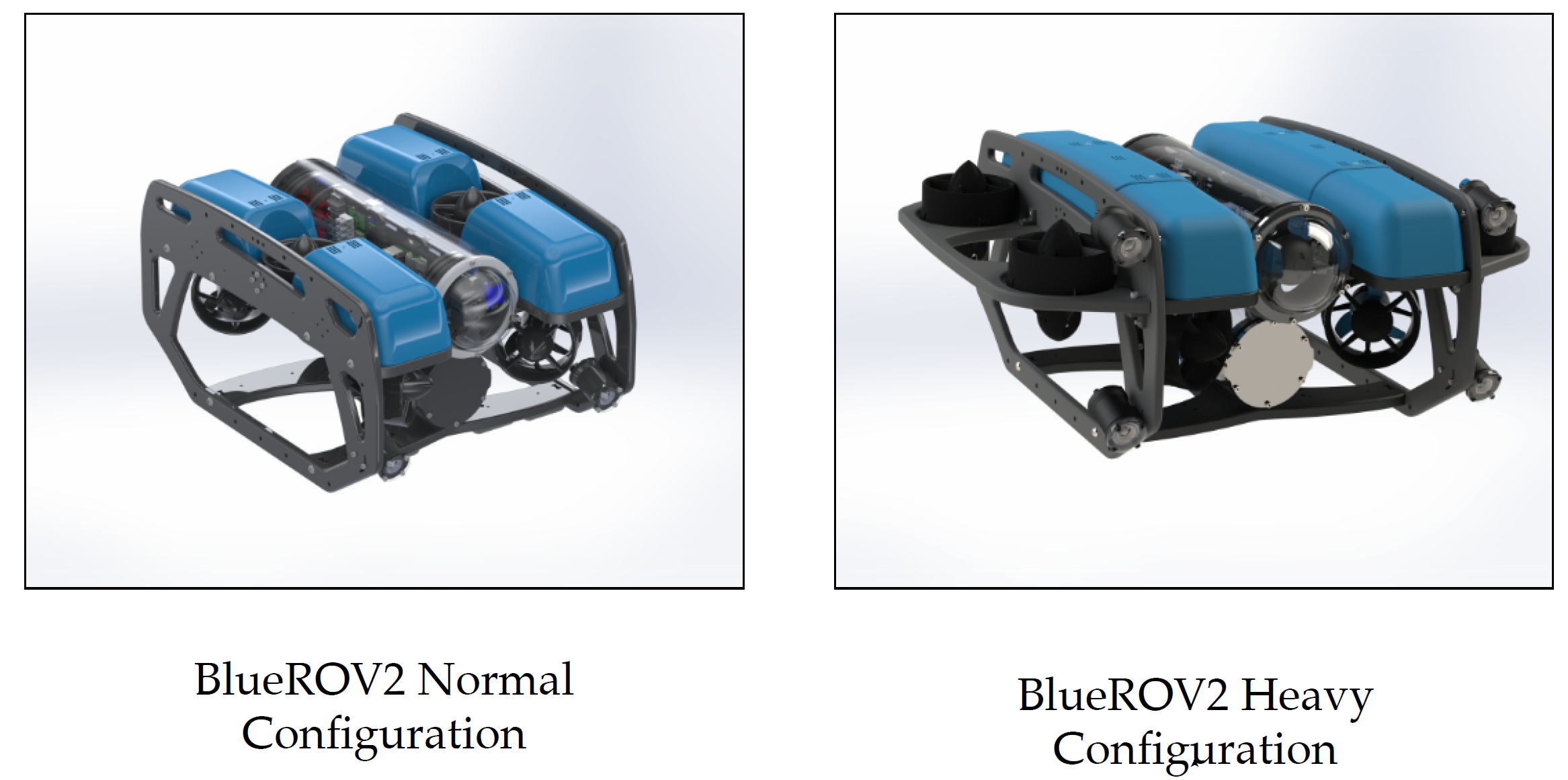
BlueROV2 is a commercial underwater ROV with public CAD, assembly documentation and an open software stack. This profile selects the standard six-thruster R4 configuration. The optional Heavy upgrade adds two thrusters and changes the assembly and control configuration, so the two should not be treated as one interchangeable parts list. [1] [4]
Is this for you?
- Known limitations
- R4 CAD archive contains three public model files, not complete editable manufacturing internals for every component
- Vendor explicitly says some hardware elements remain closed
- Exact CAD licensing and complete matched software source payload not established here
- Depth capability and delivered cost depend on selected enclosure and accessories
3D preview
BlueROV2 R4 public CAD assembly. The Blue Robotics public R4 CAD assembly (BLUEROV2-R4-PUBLIC.STEP from the BLUEROV2-R4.zip archive linked on the BlueROV2 product page) in the standard six-thruster configuration, not the Heavy upgrade: frame, six T200 thrusters, electronics and battery enclosures, Navigator and Raspberry Pi 4 boards, camera tilt, connectors and fasteners at their source placements. Purchased third-party components modeled in the assembly (for example the Raspberry Pi, servo, terminal blocks, wire, O-rings and fasteners, some carrying McMaster-Carr part numbers) are kept as placed; their CAD terms are unknown. Triangulated at 0.5 mm and 1.0 rad tolerance for display, so small threaded fasteners look faceted. No license is attached; see the notice below. Fit, sealing and operation are not verified.
No license: Blue Robotics attaches no license to this CAD file. Its open-source page says: “We publish STEP and STL files of our products directly on our website, enabling easy integration and modification.” Its website Terms and Conditions, Section 3, say: “You agree not to reproduce, duplicate, copy, sell, resell or exploit any portion of the Service, use of the Service, or access to the Service or any contact on the website through which the service is provided, without express written permission by us.” Open Source Robotics shows this vendor-published model for reference only and claims no license, redistribution, manufacturing or commercial clearance. License: Blue Robotics Terms and Conditions · upstream notice.
The 3D preview loads after the page.
Drag to orbit · Scroll or pinch to zoom · Right-drag to pan. Use the view buttons for front, side and top views. The tree shows names supplied by the source; unnamed bodies remain labeled as such.
Download original STEP source evidence bundle (ZIP; the original STEP is in two gzip parts listed inside) · File checksums and provenance · Download complete source (gzip)
Separate bodies can be inspected in the model tree. Explode is a viewing aid, not an assembly sequence.
Model sources
The preview uses the linked original design. Source grouping is retained where present; the caption identifies whether this is an assembly or one component.
Source, license and scale
Source: Blue Robotics, revision BLUEROV2-R4.zip sha256 d498158e662a812793e54b87471900d19ce918d5542d50147decb461f99234b0. Original and preview: No license stated (vendor terms quoted). Preview conversion by Open Source Robotics; original file unchanged. Preview coordinates are centered and rounded to six decimal places. STEP preview triangulated in millimetres. No physical part tested.
Viewer: three-cad-viewer 5.0.7 (MIT license). Confirm scale and manufacturing settings before printing.
What you need
- Operating system
- Windows 11
- macOS
- Linux
Topside computer recommendations in preserved setup guide; Android and iOS not officially supported there.
Hardware & parts
Assembly & first use
Cost
No current, complete configuration-specific build cost has been established for this profile.
Project notes
Match the hardware revision before using the guide
The R4 assembly guide identifies Navigator-based vehicles sold from June 2022 onward. It points owners of the earlier Pixhawk configurations to different guides. The current product history also records component changes within R4, including enclosure interfaces, camera mounting and thruster details. The R4 label therefore does not by itself pin every part in a delivered vehicle. [1] [4]
The preserved R4 CAD download contains three public model files: IGES, a SolidWorks part and STEP. Those are useful integration artifacts, but their presence does not establish a full native assembly with editable manufacturing internals for every purchased component. No dimensions, assembly mates, fabrication process or exported model were validated in CAD here. [2]
The manufacturer's source policy explicitly says some hardware elements remain closed while it publishes models to help integration and modification. This profile consequently records partial source availability and leaves the precise CAD reuse license unresolved. An open software stack does not automatically supply rights to reproduce all of the vehicle's hardware. [3]
Keep the onboard and topside software separate
The documented R4 arrangement pairs Navigator with Raspberry Pi 4. BlueOS manages onboard services, networking and video; ArduSub handles vehicle control; Cockpit provides the pilot interface on the topside computer. The setup guide directs owners of older Pixhawk/Companion systems to a different route. [1] [5]
Its topside recommendations include Windows 11, macOS and Linux, with Android and iOS not officially supported in the preserved guide. The preserved guide requires BlueOS 1.4.5 or later, a gamepad controller and stable Wi-Fi without a captive portal for setup. It covers hardware connections, network setup and vehicle configuration before piloting. This review preserved those documents, not a complete matched source archive or installed release of every software component. [5]
Account for the whole working ROV
The product page reports a vehicle depth rating of 100 m with acrylic tubes and 300 m with aluminum tubes. It also lists choices for tether, lighting and accessories. Those are configuration-specific manufacturer claims, not depth or performance tests conducted by this catalog. [1]
The same page says the operator must supply a laptop, battery and charger separately. A useful budget must therefore account for those items, the selected kit and tether, regional delivery and any accessories. This review leaves the complete delivered cost unknown instead of presenting an unconfigured starting price as the cost of a working ROV. [1]
The assembly guide describes a partially assembled kit with separate standard and Heavy routes. Source review does not replace the mechanical, electrical and software checks required for the selected vehicle. No assembly, software installation, leak test or underwater operation was performed here. [4] [5]
What we checked
Source research only; no installation, physical build or performance test performed. No affiliate links added.
Not yet established
- Requirements: tools
- A step-by-step setup summary
Updates
- Upstream last updated
- Not established
- Latest release
- Not established
- Profile updated
- Oct 26, 2026
- Sources last checked
- Oct 1, 2026
- Next review
- Oct 31, 2026
- Reviewed revision
- R4 CAD archive, SHA-256 d498158e662a812793e54b87471900d19ce918d5542d50147decb461f99234b0
Source files and licenses
Available project sources support research coverage; complete build and commercial qualification remain separate.
| Layer | Availability / license |
|---|---|
| mechanical design | available · License not fully assessed R4 public IGES, SolidWorks part and STEP asset preserved. Integration CAD does not establish complete manufacturing design or an explicit reuse license for every component. [1] [2] [3] |
| electronics | not found · License not fully assessed Vendor identifies open software and hardware interfaces, but this selected vehicle/CAD review does not establish complete matching source payloads and license coverage for this layer. Not a claim that separate software repositories are closed or unavailable. [1] [3] [5] |
| firmware | not found · License not fully assessed Vendor identifies open software and hardware interfaces, but this selected vehicle/CAD review does not establish complete matching source payloads and license coverage for this layer. Not a claim that separate software repositories are closed or unavailable. [1] [3] [5] |
| software | not found · License not fully assessed Vendor identifies open software and hardware interfaces, but this selected vehicle/CAD review does not establish complete matching source payloads and license coverage for this layer. Not a claim that separate software repositories are closed or unavailable. [1] [3] [5] |
| documentation | available · License not fully assessed Public assembly and setup guides preserved; their reuse license not established by this review. [1] [4] [5] |
Selected conventional piloted ROV route does not require a particular learned model or training dataset.
References
Each source links to the exact revision we read. “Used for” shows where this page relies on it.
Project sources
- S001 Blue Robotics product
Revision, date & where cited
Blue Robotics / project contributors · bluerobotics.com · official page preserved 2026-10-01T06:12:36.073787+00:00 · Accessed Oct 1, 2026
Used for: Overview, Is this for you?, What you need, Hardware & parts and 5 more - S003 Blue Robotics source-policy
Revision, date & where cited
Blue Robotics / project contributors · bluerobotics.com · official page preserved 2026-10-01T06:16:11.022757+00:00 · Accessed Oct 1, 2026
Used for: Is this for you?, Match the hardware revision before using the guide, Source files and licenses - S004 Blue Robotics assembly
Revision, date & where cited
Blue Robotics / project contributors · bluerobotics.com · official page preserved 2026-10-01T06:16:13.600008+00:00 · Accessed Oct 1, 2026
Used for: Overview, Hardware & parts, Assembly & first use, Match the hardware revision before using the guide and 2 more - S005 Blue Robotics software-setup
Revision, date & where cited
Blue Robotics / project contributors · bluerobotics.com · official page preserved 2026-10-01T06:16:14.795766+00:00 · Accessed Oct 1, 2026
Used for: Is this for you?, What you need, Hardware & parts, Keep the onboard and topside software separate and 2 more - S002 Preserved BlueROV2 R4 CAD asset and inventory
Revision, date & where cited
Blue Robotics / project contributors · cad.bluerobotics.com · SHA-256 d498158e662a812793e54b87471900d19ce918d5542d50147decb461f99234b0 · Accessed Oct 1, 2026
Used for: Is this for you?, Match the hardware revision before using the guide, Source files and licenses - S009 Upstream image and reuse attribution
Media-only review: Upstream paper illustration comparing the normal and heavy BlueROV2 configurations (Figure 2, 2022); it does not establish the current R4 configuration. Reuse basis: CC-BY-4.0. Inspected the source image, its caption and the actual reuse declaration; no image-specific exception or different credit was found for this selected image. The grant is used only for this media, not as a new hardware/software license. Embedded image extracted from page 4 of the source PDF and losslessly decoded to PNG; no retouching. Technical/cost evidence dates unchanged.Revision, date & where cited
Malte von Benzon, Fredrik Fogh Sørensen, Esben Uth, Jerome Jouffroy, Jesper Liniger and Simon Pedersen · doi.org · Figure 2, article page 3 / repository PDF page 4; image SHA-256 233e656048b1db66db11248e3ac431382248d22ad62396afac8432e0a25fd026 · Accessed Oct 26, 2026
Videos
- S006 Blue Robotics (YouTube channel)
The project’s own YouTube channel, linked from the project’s own documentation. Not reviewed by us for accuracy.Revision, date & where cited
YouTube channel Blue Robotics · youtube.com · Accessed Oct 4, 2026
- S007 Blue Robotics Tutorial: Vacuum Testing the Enclosures on a BlueROV2 (YouTube video)
Video from the project’s own channel (Blue Robotics), linked from the project’s own documentation. Not reviewed by us for accuracy.Revision, date & where cited
YouTube video Blue Robotics · youtube.com · Accessed Oct 4, 2026
- S008 Blue Robotics Product Overview: BlueROV2 R4 (YouTube video)
Video from the project’s own channel (Blue Robotics), linked from the project’s own documentation. Not reviewed by us for accuracy.Revision, date & where cited
YouTube video Blue Robotics · youtube.com · Accessed Oct 4, 2026
Correction guidance · Discussion is not enabled · Profile format 0.6.0-draft.1
Change history
2026-10-04 — Added 3 YouTube reference(s) (S006, S007, S008): official channel or videos linked from the pinned upstream sources. Existing claims, source-check dates and evidence are unchanged.
2026-10-26 — Added attributed upstream media with linked reuse terms; technical evidence dates unchanged.